Sets
Deliberate API exposes geographic information as a collection of sets. A set is associated with tags, contains properties, and shares relationships with other sets. Understanding these primitives and their functionality makes it easier to compose powerful queries.
What is a Set?
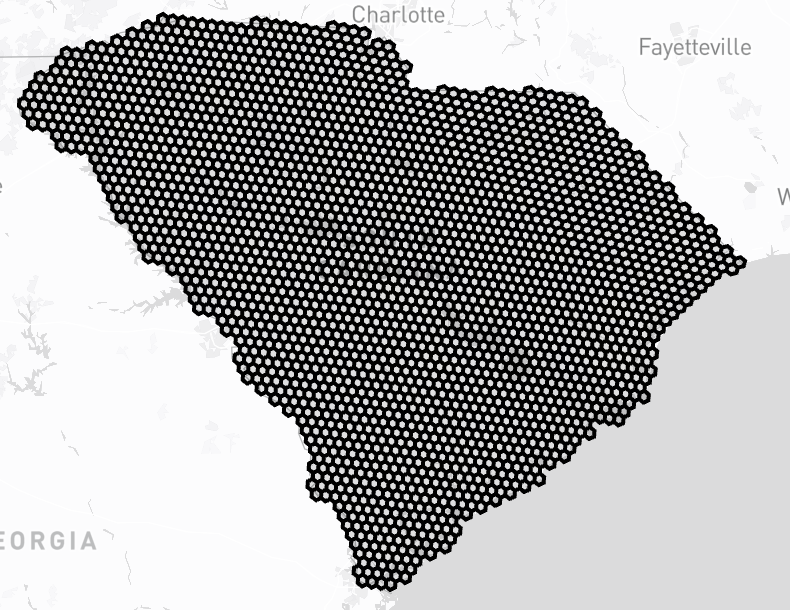
A set is a collection of cells representing a geographic area. These cells can be adjacent to each other, forming a contiguous geographic area. A set can also be a collection of multiple non-contiguous geographic areas. An example of a contiguous set is the state of South Carolina.
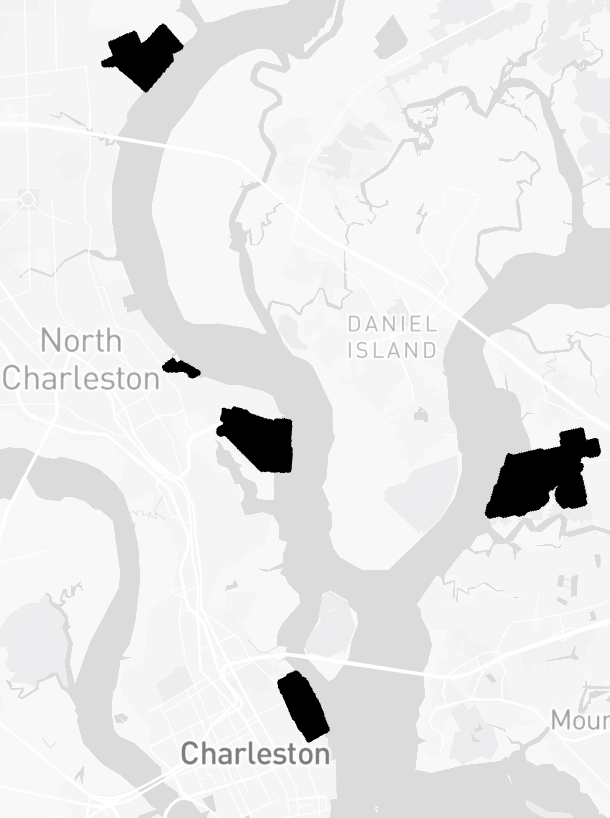
An example of a disjoint set is the South Carolina port complex which is made up of multiple ocean terminals.
Properties
Properties are key-value pairs that store descriptive information about geographic sets. They provide a way to attach metadata and filter sets based on specific attributes.
What are Properties?
A property is a key-value pair attached to a set that describes characteristics of that geographic area. Properties can include names, codes, numeric values like population, or any other relevant metadata.
Common Properties
Different types of geographic sets have different properties. Here are some examples of properties you'll find in pre-loaded sets:
U.S. States
name- Full state name (e.g., "California")abbreviation- Two-letter code (e.g., "CA")fips_code- Federal Information Processing Standard code
U.S. Counties
name- County namestate_abbreviation- Parent state codefips_code- County FIPS code
National Parks
name- Park nameunit_code- Park identifier codeunit_type- Type of unit (e.g., "National Park")
Countries
name- Country nameiso_a2- Two-letter ISO codeiso_a3- Three-letter ISO code
Querying by Properties
Use the properties filter to find sets based on their property values. The most common operator is eq (equals):
Property Operators
Properties support various comparison operators for flexible filtering:
eq- Equals (exact match)ne- Not equalsgt- Greater than (numeric values)gte- Greater than or equal tolt- Less thanlte- Less than or equal toin- Matches any value in a listcontains- String contains substring
Numeric Comparison Example
Find countries with population greater than 100 million:
Using the "in" Operator
Find multiple states by name:
Properties vs Relationships
Important: Properties should not be used to store information about how one geographic area relates to another. For example, don't add a country property to a state set to indicate which country it belongs to. Instead, use relationships, which are a first-class concept in Deliberate API designed specifically for modeling geographic associations.
Custom Properties
When creating your own geographic sets, you can define any properties that are relevant to your application. Properties can be strings, numbers, booleans, or nested objects, giving you flexibility to model your domain-specific data.
Query Examples
This page demonstrates common patterns for querying the Deliberate API.
Find sets related to specific tags
Use the tags filter to narrow results to sets tagged with specific tags.
What's at This Location?
The spatial contains_point filter lets you discover what geographic sets contain a given latitude/longitude coordinate. This is perfect for reverse geocoding—finding out what country, state, county, or other boundaries contain a specific location.
In this example, we're querying the coordinates for Los Angeles, California (34.0522°N, 118.2437°W). The API will return all sets that contain this point, such as the United States, California, and Los Angeles County. Try changing the coordinates to any location you're interested in!
Find the Timezone for a Location
Combining tags with spatial queries enables powerful lookups. Here we're finding which timezone contains a specific location—in this case, New York City (40.7128°N, 74.0060°W).
By filtering for sets tagged with timezone and using the contains_point spatial filter, we can instantly determine the timezone for any coordinate. This is useful for applications that need to schedule events, display local times, or handle time-sensitive operations across different regions.
Find All National Parks in Utah
Relationships let you query geographic sets based on their spatial associations with other sets. In this example, we want to find all national parks that are geographically contained within the state of Utah.
The query works in two steps: First, we target sets tagged with us_national_park. Then we use a relationships filter with type SUBSET and direction outbound to find parks that are subsets of Utah. This returns famous parks like Zion, Arches, Bryce Canyon, and more.
Query Reference
Complete API reference coming soon. Check out the query examples above to get started!